Showing posts with label Teaching with Technology. Show all posts

Thursday, April 23, 2015

Kindle Books + Audible Books + Fire HD = Immersion Reading:
Even Better Than Tinkerbell!

Remember read-along storybooks?  The ones when you "See the Pictures -- Hear the Record -- Read the Book," and a sound alerts you to Turn the Page?  Back before apps, before CDs, even before cassette tapes, many of the original read-alongs were adaptations of Disney cartoons, released on 45 rpm vinyl records.  In the Disney ones, Tinkerbell's ringing bell signaled that it was time to turn the page to continue with the printed text.  Look Mom, I'm "reading!"


A certain fine young man I know, VB, doesn't much like to read. He enjoys the stories, but reading is hard, and slow, and tires him out.  Kind of like running. Ugh.  Who can really blame a guy for choosing other leisure activities?
Once. U-pon. A. Time . . .

For school, though, reading isn't optional.  There are a number of assistive technologies available, like text-to-speech software, and Reading for the Blind & Dyslexic materials, that let VB listen to the spoken text and read along with it, but they're inelegant. The "Robbie the Robot" voices do they best they can, but often words are pronounced oddly, or without the inflections of meaning that are obvious to a fluent human reader.

None of these options has trumped Tinkerbell, until Amazon.com (which offered a text-to-speech Kindle option that VB liked ok)  figured out how to synchronize Audible.com audiobooks with Kindle ebooks on the Kindle Fire HD tablet, using their Whispersync technology. They call it Immersion Reading, and  It's Awesome! 

Immersion Reading plays the professionally recorded audiobook synchronized to the corresponding text on the screen, with real-time highlighting of each word as it's read.  And poor Tinkerbell is out of a job -- the Fire HD turns the page automatically along with the narration.

On the slight down-side, it does mean buying the book twice, once from Audible and once from Kindle (both are owned by Amazon.com), and not all books have compatible audiobooks.  It doesn't work on a regular Kindle, though they say it will work on Android devices other than the Fire HD.

On the upside, though, since both are owned by Amazon.com, there is often a significant discount on the Audible book once you've purchased the Kindle book (The Martian  by Andy Weir was $5.99 for the Kindle book, and the Audible add-on was only $2.99.  Not all pairs are that good a deal, though).

The proof of awesomeness?  VB has asked for all his school lit books on the Fire HD, and even started reading one 3 weeks ahead of time.  He has also asked for leisure reading books (yay!  "Reader's Advisory" is fun!), and upon finishing one, he asks for another.  He says he understands what's going on much better with a human reading the story, and his work in lit class shows it.  "Reading on the Kindle Fire" even merited its own bullet-point in his recent presentation on his best learning strategies.  Wow.

After all, it's immersion in language and stories that matters, not the container.  Sorry Tinkerbell, this time I think you're out of a job for good.

Have you tried the Fire HD with Immersion Reading?  Or another assistive technology for reading?  Share your experiences in the comments.


VB's Top Immersion Reading Experiences So Far

Long Way Gone  by Ishmael Beah (for school)
Divided We Fall  by Trent Reedy
     (leisure reading; #1 favorite! VB is impatiently waiting for the audio version of the sequel)
The Martian  by Andy Weir (reading now)
The #1 Ladies Detective Agency  by Alexander McCall Smith
      (for school. Better than he thought it would be -- thanks to Immersion Reading!)

Friday, January 10, 2014

Research for Science Classes

I've created a Blogger page as a class outline for presenting science research methods and sources to Larry's DuPont Challenge and Science Fair short term classes.  Link to this page below.

Researching Science Information On the Web

Tuesday, November 12, 2013

f0r}P3+3]sS@k#!:
Guard Your Online Info with a Strong Password


Earlier this fall I mentioned that I'd spent part of the summer reading all the detective/mystery novels by Michael Connelly. One of the novels, The Scarecrow (borrowed from the DeKalb Public Library's ebook collection), features a very, very bad guy who is also a computer security expert.   I was alarmed at how easily this bad guy was able to break into various characters' email and bank accounts, destroying their finances and careers by altering and deleting vital information.   My passwords have been reasonably ok, but since The Scarecrow, I've been going through and upgrading all my passwords, starting with email, and anything that has financial information involved (bank, PayPal, Amazon.com, mortgage company, iTunes, etc etc).

 AARGH!! How can anybody come up with strong, unique passwords for every single dad-blamed website (because, of course, you have to have a username and password for EVERYTHING, from PiBites to updating your directory information, all on different platforms with different accounts.)

Fortunately, Gwyneth Jones, The Daring Librarian, has come up with a nifty comic tutorial encapsulating all the sage advice on creating unique, strong AND rememberable* passwords for all your sites.  In a nutshell:
  • 1. Make your password at least 12 characters long.
  • 2. Make it complex -- use a phrase (not just a dictionary word) with special characters,
    numbers and both upper and lower case letters
  • 3. Add to your main passphrase characters that make it unique for each site (for instance, the
  • first three letters of the site name, backwards) so you have to remember only one complicated phrase, and the site reminds you of the rest.
     
Can you guess the passphrase in this post's title? It's  f0rP3+3sS@k#!  (for petes sake!).  Vowels are from the number line, spaces are brackets }, and the "t" was replaced by a plus sign.  It looks completely random, but you and I know the secret to remembering it.

The complete tutorial is in the graphic below, and you can download a higher-resolution printing copy of the file from Gwyneth's Flickr site. Post it on your office bulletin board or next to the computer  -- but f0r}P3+3]sS@k#! don't write your passphrase on it!


Of course, you also have to figure out all the zillion sites where you've had to set up accounts over the years, but I can't help you with that.

Check out the rest of The Daring Librarian's 10 Super Geeky Tips for the New Year on her blog.

Are you using lame passwords?  Do you have any additional password tips?  Share in the comments!


* "memorable" is for dates and fabulous novels. "Rememberable" -- able to be remembered -- is a much better for this purpose :-)

Monday, October 7, 2013

Creating Powerful PSAs

For Magnus' Biology 2 class


A PSA ("Public Service Announcement") is a "message in the public interest disseminated by the media without charge."  In other words, it's an advertisement with information for the general public, run for free on TV, radio, billboards or magazines.

What the definition doesn't say is that a PSA has to be:
  • short
  • powerful
  • important

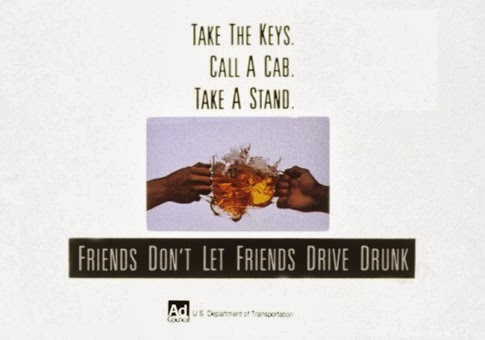
Do you recognize any of these images?


They're some of the most famous PSAs of the last century.

How about this recent radio PSA from the CDC -

Tips for creating a great Public Service Announcement ---
  • Know your GOAL - to get people to take a specific action (stop littering, wash hands, stop texting while driving)
  • Talk about RESULTS - a beautiful countryside, not getting bird flu, not causing a car crash)
  • Use informal EVERYDAY LANGUAGE (not lit writing or police speak)
  • Use EMOTION
  • Make it PERSONAL
  • Stick to ONE MESSAGE
  • Remember that SOUNDS CREATE PICTURES.  If you use sound effects or music, it must make the right picture in the listener or viewer's mind.
  • Keep it SHORT.  30 seconds is very common. 
  • IDENTIFY the sponsoring organization. 


Resources

How to Create the Perfect Public Service Announcement (Center for Digital Education)

How to Write a Public Service Announcement (pdf, from Kansas Association of Broadcasters)

Public Service Announcements (Wikipedia article)

Distracted Driving video PSAs (The Hill)

Sound Effects clips

Sound Bible (wav & mp3 files)
FreeSound (wav files)
Big Sound Bank (wav, aiff, mp3s; a French site)
FreeSFX (mp3s)

Wednesday, May 16, 2012

21st Century Gutenberg Revolution:
Free eBooks for iPad & Kindle

If I gave in to frustration, I'd be totally bald from pulling out my hair over the ebook dilemma.  The best delivery systems either don't have the titles I want to offer or cost way too much for our little school, or both.  We are "evolving" on this issue, but for now progress is stalled.

When I first got my iPad and began to explore ebooks, I scoffed at friends who were all about free ebook downloads.  "They're all ancient," I thought, "who wants to read that?"  Yes, a librarian who was being a dumbhead about the classics. Gosh, sometimes I am so dense.  In any case, I'm now getting a daily list of all the books in the public domain that have been added to the Project Gutenberg electronic book collection, and you know, there really is some good stuff there!

"Public Domain" is a legal concept -- under United States law, creators (or assignees) automatically own the right to decide what happens to their creative works as long as they live, and the right extends to the creator's estate for 75 more years.  After that, unless an extension has been granted, that creative work goes into the public domain -- it is owned by the people.

Project Gutenberg began in the 1980s as a labor of love by a man named Michael Hart.  Since the beginning, PG volunteers have hand-typed and proof-read thousands of public domain texts, in many languages.  The first PG electronic books were computer only, but now almost every title is available in Kindle, Nook, iPad and other e-reader compatible formats.  Some even include full color illustrations!

Below is just a tiny sample of the public domain books you can download for free from Project Gutenberg.   The annotations are mine (a drawback to the project is that there's no synopsis or other description for any of the titles, so using a few research skills, and Wikipedia, does come in handy).  The PG catalog also includes audiobooks (both human-read and computer-read), and if you'd like to practice reading in  Yiddish, Norwegian, Tagalog, or any of 60+ other written languages, PG has ebooks for you too.

  • A collection of essays, published in 1917, by American music writer and critic James Huneker. Included are essays "In Praise of Unicorns," on George Sand, James Joyce, Henry James, Brahms, Wagner, Cezanne, and "The Great American Novel."
  • Frank V. Webster was a pseudonym controlled by the Stratemeyer Syndicate (publisher of The Hardy Boys and Nancy Drew books). This pseudonym was used on books for boys from the early 1900s through the 1930s. Two Boy Gold Miners was published in 1909.
  • Tom Swift and His Motorcycle; or, Fun and Adventure on the Road  by Victor Appleton. 
    The first book (1910)  in a long-running series from the Stratemeyer Syndicate.  Tom is a teenage genius inventor, modeled after such real-life inventors such as Henry Ford and Thomas Edison, whose adventures have inspired young people from Issac Asimove to Steve Wozniak.  As with so many older books, readers should be aware that ethnic and racial depictions can follow negative stereotypes, and parents may want to be prepared to discuss changes in society since then.
  • Anton Felix Schindler was an associate, secretary, and early biographer of Ludwig van Beethoven. His "Life of Beethoven," first published in 1840, had a great deal of influence on later Beethoven biography. He claimed to have been Beethoven's best friend.
  • 1910 horror story by Algernon Blackwood, one of the most prolific writers of ghost stories in the history of the genre.   In the Canadian wilderness, a hunting party separates to track moose, and one member is abducted by the Wendigo of legend (a malevlolent canibalistic monster, possibly created when a person ate human flesh).
  • The Man in Black by Stanley John Weyman
    Written by an author much celebrated in his time, and later by modern author Graham Greene, The Man in Black is a short and spellbinding Cinderella tale with a monkey, a cruel, crafty-eyed showman and the evil of the man in black, a charlatan and wizard. This is a tale of corruption, abuse of the innocent and the complete destruction of evil by good. One of the most imaginative and clever works by Weyman, it is a magnificent tale.

If you have an eReader, but aren't quite sure how to go about downloading from Project Gutenberg (or for that matter, from your Atlanta area public library), zap me a message, come on by the library and we'll try to get you set up.  It's one of those tricky things that, once you know how, it's not so hard, but a helping hand is really really useful in getting started.

Are you planning to read any classics over the sumer?  On paper, or "pad?" 


Monday, November 14, 2011

Hacking High School

Is "hacking high school" a good thing or a bad thing? When I was in school, "hack" was usually a bad thing, like a dull, boring journalist, or breaking into somebody else's computer -- unless it was a good thing, like an amazingly clever MIT student prank.

Today, hack has several positive connotations, including the idea of achieving a goal (beating your videogame?) by circumventing the rules or following a non-traditional path.

In a guest post on the New York Times Learning Network, 19-year-old Dale Stephens, founder of Un-College.org, advocates "hacking," or taking charge of one's own education.
The reality is that school and dropping out are not the only two options. You can hack your education. That means breaking some rules. It may also mean annoying some people. But most important, it means creating options and opportunities for yourself where it seems none exist.
The late Steve Jobs is today's iconic un-college graduate. He dropped out of Reed College after 6 months because he didn't think it was worth his parents' money. What Steve Jobs didn't drop out of, though, was following his curiosity and feeding his passion for learning. He hacked a college-level education by going to classes that interested him, even when they seemed to have no practical application.

Now more than ever, any student can learn almost anything with a self-directed study plan. Thanks to school and public libraries, it's always been possible to enrich a class you're taking in school, or to learn something not offered in high school, but the 21st century student has practically unlimited resources at hand. In addition to books and DVDs and audios, there is free information through the Internet (as long as you filter carefully for reliability), there are free online classes offered by great universities, there are online tutorials, TED talk videos, textbooks and how-to videos everywhere, for everything under the sun.

Even an awesome school like Paideia (ok, I am biased, but shouldn't I be?) doesn't have in-depth courses in all the topics that teens can be passionate about, but we can encourage students, formally through independent study, or informally, by supporting the curiosity of students in "hacking" high school.

Last year I wrote about Open Culture, a fabulous website that pulls together links to "the best free cultural & educational media on the web." This site could be subtitled "The Official Un-College Bookstore."

Want to learn Japanese but your school doesn't teach it? There are widgets, podcasts, free software, a Facebook page, and even websites that will connect you to a Japanese speaker for real-time conversational practice. Borrow books on language and culture from your school or public library. YouTube videos can show you how to fold origami, or a traditional gift wrap.

Want to learn to code Javascript and develop dynamic websites, but your school doesn't teach computer programming? Watch online videos from Harvard computer science courses, and go through four Javascript courses at Code Academy. Buy or borrow O'Reilly Media's series of Javascript manuals, from beginning to advanced. Find and join an online forum, and ask questions of with expert professionals. Or, focus on programming in C (also a Harvard Extension course), then take Stanford University's Developing Apps for iOS, and start writing and selling iPhone apps.


There's nothing stopping anybody from hacking an awesome education. All it takes is curiosity (and a free public library card). But, professor and researcher Michael Wesch warns,
I think there's the potential now for a kind of curiosity gap. Consider how much further ahead a curious student will be, compared with a student who lacks curiosity, in an environment in which he or she can reach out and grab new knowledge anytime, anywhere on all kinds of devices. If you’re a curious person, you’ll learn and grow; if you’re not, you could just drift along while others race ahead.
No way am I saying school is irrelevant. Even in this hyper-connected century, school can be an invaluable place for students to learn and grow, AND follow their curiosity. Why? Because schools are full of adults who have learned, who know how to learn, and who have chosen to spend their days helping students learn. Libraries are incredible sources of information in all kinds of media, but without a guide (librarian) for finding, evaluating and understanding, it can be really hard to discern signal from noise, much less process the signal into meaning.

We, the adults in schools, can encourage students to hack as much of their learning as possible. Who knows what will be career-worthy in 2015? Curiosity, drive and knowing how to learn is always going to be a valuable job & career skill, whether it's in college, graduate school, or the school of hard knocks.
So school can’t just stop at helping students get to the signal amid all the noise but also want to figure out what to do with the signal once they’ve found it –[schools should] help them be curious and excited about where the signal can take them.
net.family news
Curious? Want to follow your interests? Come see me in the library!

Thursday, September 15, 2011

So Much More


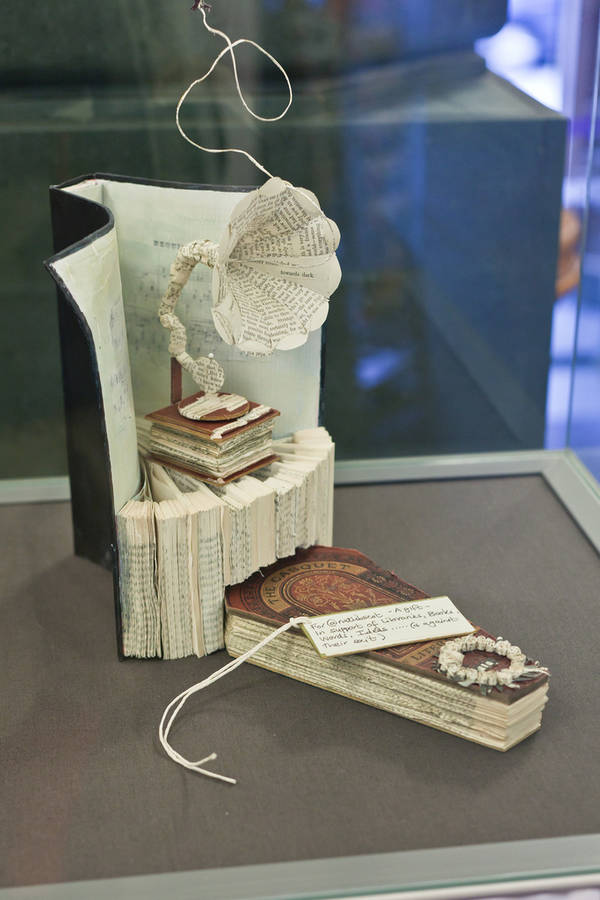
This morning, a student sent me an e-mail with a link to a series of mysterious and beautiful incidents happening in Scottish libraries this year. An anonymous (and very talented) artist has left intricately detailed paper sculptures in at least seven libraries, along with notes of encouragement and support. The first sculpture, found in the National Poetry Library, was left with this note:
... We know that a library is so much more than a building full of books… a book is so much more than pages full of words.… This is for you in support of libraries, books, words, ideas….. a gesture (poetic maybe?)
Though the word library has "book" at its very heart (liber = "book" in Latin), any library worth its salt is all about content rather than containers. A library's mission is to provide information/knowledge/content to its patrons, and the best way to do that is to collect and store the information in containers that patrons can use. The 21st century has swept in with a monumental shift in preferred containers - as digital books on CD-ROM, then as online texts that lived on the Internet. The current wave is bringing in digital texts that arrive through the Internet, but that live on and are accessed through devices that don't have to be connected in order to be read (Kindle, iPad/Pod/Phone).

I think that the discomfort of the "digital immigrant" population's resistance to the ever shortening tether to the Almighty Screen (my bias shines through, doesn't it??) is at its heart a worry about the quality of online content. Librarians and teachers fuss about the shallowness of content and how easy it is for users to find mediocre information online; on the other hand, we happily offer periodical databases and online journals and downloadable unabridged novels.

My struggle with the Almighty Screen is ongoing. I use and teach with a computer all day, the Internet is a go-to for all kinds of questions, deep and otherwise, and I LOVE my iPad. About half of my summer books got read as Kindle books, iBooks, or ePub books borrowed/downloaded from the Atlanta-Fulton Public Library. And yet I read with concern (with a Kindle app on my iPad) the huge volume of research data collected in Nicholas Carr's The Shallows: What the Internet is Doing to Our Brains, which very clearly demonstrates that the nature of electronic reading fundamentally changes our neurological pathways, and exercises very different areas of the brain than does print-on-paper reading. Carr argues that the medium IS the message, that the device determines how information is packaged and delivered. For every gain (ease and wealth of information, available to everyone, quickly) there is a loss or trade-off (we don't pay attention very well or for very long any more). Rolling the newspaper, a novel, an encyclopedia, your diary, the postal service, the typewriter, the television, the radio, and the video game console all into one portable device means potential for knowledge and potential for distraction everywhere, all the time, just a click or a flick away.

So many things are different and scary when content is separated from container. For librarians there are practical challenges -- how do we describe and store information for easy retrieval (ie, catalog) when it's not in a fixed container? How do we help people find and make sense of information when they don't have to come to the library for the container? How do we justify spending a large percentage of annual budgets to collect information that is available only as long as we pay the vendor and the electricity bill? How will artists create art out of books, if there are no books?

The Kindle experiment last spring gave rise to my "content not container" philosophy, and -- contrary to trends in many other excellent school libraries -- we're not going into the business of loaning eReaders. We will be looking to start loaning content for our students and faculty to read via their container of choice - be it a Kindle, an iPad, a Nook or a Netbook. I am looking forward to Amazon.com's upcoming launch of their library-loanable Kindle books (I like the way Amazon's Kindle app makes their Amazon-only books readable on many devices other than just Kindles).

The criteria for choosing the content will be the same as ever -- high-quality content that meets the personal and educational information needs of the Paideia community. Fiction, non-fiction, audiobooks, eBooks, print books too. And our daily work will remain the same -- to teach (guide, lead, coach, accompany) students and faculty to find, evaluate and use the desired information. Some things don't have to change.

Libraries are, and should always be, so much more than than buildings full of book.

Tuesday, April 12, 2011

Kindles in the Library, Redux

Finally, a compelling reason (for me, at least) to have library-owned Kindles to loan.

Back in February, the Library got its first Kindle eReader. I played with it for a few days, and was underwhelmed (lots of thoughts, written up in this post). Since then, two teachers and one student have "test-read," with mixed reactions. I'm not sure what it says that none of the three actually finished the book that was requested and loaded on the Kindle for them.

For both teachers/adults -- one was reading a book to prep for class, the other was reading a novel for fun at the beach -- the biggest frustration with the electronic device was the inability to flip back and forth through the pages, or to create a visual memory of how far along in the book a certain scene takes place. Taking notes isn't really that easy either. The student said he got used to it and liked it a lot, but didn't have much time for pleasure reading during the semester. I'd pretty much come to the conclusion that eReaders really are best as "personal electronics," and that it still makes more sense for libraries to loan content rather than devices.

And then last week, a student asked for an audiobook of Makes Me Wanna' Holler, a non-fiction title he is reading in class. Sure! we have audiobooks, specifically for students who learn as well or better through their ears than eyes. Only not this one, and it's apparently not available on CD (or even Audible.com), only on cassette, used. Even worse, the cassette edition is abridged. Even if I were to buy it, which I didn't want to do, it would be of limited value. The teacher came to ask how we can support this student. Think think, ponder ponder. The Kindle was sitting on my desk, just returned from its spring break checkout. Eureka!! (or, like DUH) What about the Kindle text-to-speech function I'd heard about? How good/awful is it? Could this be an option?

A quick check confirmed that the needed book was "text-to-speech enabled" (some copyright holders have demanded disabling of this function, concerned about potential impact to audiobook sales). Note sent to the next teacher on the Kindle test-drive list explaining the delay (gulp, it's the Headmaster.) Book purchased, downloaded and device ready to be checked out by break. The Kindle has a jack for headphones, and after class (the one reading the book), this student was already so enthusiastic he asked if we had his lit book on audio! Downloaded and ready by the end of the day. So now the one Kindle is helping this student in two classes, and providing something that the print editions of both books just can't do.

Having a computer read out loud to you is not the greatest aesthetic experience with a book. There's even inadvertent humor involved -- when it comes to tricky stuff (as in ALL the cuss words), I'm told the Kindle just spells them out! I bet that was a lively discussion at the Amazon.com product development meetings.

Still, text-to-speech is high-level value added in my opinion, making the Kindle more than just another way to read a book. (Paul B., the Library's second Kindle will be here later this week, and you're still first on the list.) I'm also going to participate in the Technology department's new iPad test program -- with a less expensive, refurbished 1st generation iPad (w/o cameras) -- to see if offers value to students in a library-relevant way. Brief research indicated that iBook can be set up as a text-to-speech device for Apple bookstore ebooks, though the Kindle reader app doesn't have the function. We'll see.

Tuesday, March 8, 2011

Blogging Dayze

Since the beginning of Long Term 2 I have been in a Blogger state-of-mind. I've collaborated on 4 blogging projects, set up 12 different blogs for junior high and high school classes, and taught sessions on the projects, goals & expectations, and how to get started on the blogs. I love it.


The "C-word" - Collaboration -- is the heart and soul of the librarian's purpose in school. In working with teachers to co-plan the design, structure and execution of an information-based project, I support Paideia's educational goals, I support the teachers in their teaching, and I work with students on developing the skills and thought processes needed in finding and using information.

The junior high language class project is an expansion of a project from last year. It's a term-long research project, in which students in Olivia, Mark, Lisanne, & Eddy's language classes research three different topics of choice from three different Spanish- or French-speaking countries. Each topic period lasts 3 weeks. The students' research is self-directed -- they can find out and report on anything they want that's related to the topic, and there's no immediate "end product" required. Later on, they'll pick one of the country/topic pairs to do a more focused and in-depth project for the ¡Fiesta! celebration in May, but for now it's all for the fun of finding out, and learning something more about a culture and words related to their language studies.


The students have run with this assignment and are following their interests, from soccer in Argentina and Cameroon, to Oscar de la Renta (did you know he was from the Dominican Republic??!!) to HIV/AIDS in the Democratic Republic of Congo.


Carl's 9th grade World Civilizations and 10th grade American History classes are doing a different kind of project, that also works well on a blogging platform. His classes have a weekly assignment to read a current events article related to one of several specified topics, and write a reaction piece to it. Several of the students are finding their articles through subscriptions in their Google Reader accounts (did I ever mention I love my Google reader??), that they all set up earlier this school year. Some basic skills are involved in the assignment: identify author, title and source of the article (with hyperlinked URL), give a brief overview of the content, and give a thoughtful response/reaction to the article's focus.

The blogging platform works really well for these class activities. We use Blogger.com for several reasons: we can keep the blogs private but allow selected readers to see what students have written; it's easy and attractive; and, not least, a large majority of the students already have Google accounts (because of Gmail, Google Docs, other blogs they've worked with, or Google Reader) so they're ready to get started right away.

We've chosen to use one blog for a group of students (all the American History students, or all students in 6th period Spanish, for instance) rather than individual student blogs. Each student can post and edit her/his own articles, but not anyone else's, and multiple students can write and post to the blog at the same time (great for working in class). Publishing for an audience of peers is more authentic than a teacher audience-of-one, and both teacher and classmates can comment on a student's work.

One of the nicest things that the blogging platform offers is automatic indexing using "labels." A major part of the posting protocol is three labels (often called "tags" on other sites such as Facebook or Delicious.com) for each article: in JH language they are Name, Topic and Country (eg. Alex, Algeria, Music). Blogger then creates an index of every post with each label, so students and teachers can click on the label (say, Algeria), and get a page of all the posts about Algeria. Someone interested in music could click on the Music label and get a page of every music post, regardless of the country. It's also very easy for student to see where they stand in terms of number of posts and also see all their posts collated on one page. World Civ students should have read and responded to 10 different Current Events articles this semester. The index shows the number of posts per label, so when Bob sees (8) next to his name, he knows he has two more to go. It's satisfying how smoothly this works.

In the near future, John & Sydney's class will be blogging and playing with poetry, and a short term Human Sexuality class will use Blogger as an interactive website for information and projects.

I wish I could link you all to the enthusiastic work students are displaying on the blogs, but we've got them all limited to class students and teachers. You can experiment with labels and indexing features on this blog if you want -- click on Teaching With Technology at the bottom of this post to create a page of all articles with that label. The automatically generated index displays in the right sidebar. Cool, isn't it?

If you have a Junior High language student or high schooler in Carl's World Civ or American History class, ask about the blog and how it's going.

Thursday, February 17, 2011

How to Make a Librarian Smile

Bring your lit classes into the library with laptops, to search for JSTOR articles!


Ryan's Modern American Short Story classes are reading Sherman Alexie's collection Ten Little Indians. Wednesday and Thursday mornings this week, students have been in the library, finding and analyzing scholarly criticism found on JSTOR. Yay for Ryan, yay for the students, yay for JSTOR!

Monday, February 7, 2011

To E- or Not To E- (Read, That Is)


Hamlet must be busy this week -- after I titled this post, I got this update in my trusty Google Reader ("To E(book) or not to E(book)" from the DeKalb Public Library). Seems like lots of libraries are wrestling with the eReader question, and the Paideia Library has just joined in.

Natalie wrote that at least one of our elementary students was getting a Kindle for Hanukkah, and an article in last Friday's NY Times discussed the jump in children's and Young Adult e-books sales right after the holidays. After a recent presentation on pilot eReader programs in a couple of Atlanta-area private schools, I was convinced to order the Library's first Kindle, and have been playing with learning about it since it arrived a few days ago.

What are the potential plusses for having eReaders in the library?
  • Storage space! It's kind of awesome to be able to offer 10, 50 or 100 "print" titles in the shelf space of a single best-selling novel.
  • Instant availability If a student needs a non-fiction book on the Triangle Shirtwaist Factory fire, I can get it in minutes and check it out on the Kindle.
  • Multiple copies from one purchased eBook. Amazon and Barnes & Noble both allow a purchased eBook to be downloaded onto several devices. Right now I am experimenting with this feature by reading a book on the new Kindle, on my iPod Touch (using the Kindle app) and on my MacBook (also using the Kindle app). It works like a dream, very handy.
  • Coolness. I mean really, don't you think it's kind of cool to be able to check out an eReader from your local library?

OK, but what might be some obstacles & drawbacks?
  • Multiple book titles tied up in one device. Great to have 100 books stored in a small device, but when it's out, it's like 100 books are out at one time. Unless all the devices have the same titles (not impossible) it doesn't really increase availability to the community.
  • Expense. A wi-fi Kindle is $139 these days, a 3G model is $189. The Nook is similar, while a NookColor is nearly $250. And then you buy all the books to go on it (not counting free public domain books like Huck Finn or Shakespeare's plays). Our Technology department loans Flip video cameras, MacBook laptops and iPods, so this is not an insurmountable issue, but one worth considering how best to manage.
  • Vendor exclusivity. You buy a Kindle, you buy from Amazon.com. Get a Nook, buy from B&N. Or buy one of the other models out there with more flexibility but fewer options & features.
  • Limited lendability. You can't "borrow" & return eBooks from a library on a Kindle, and it's not super easy for the others, though it can be done (audiobooks are easier to 'borrow' from a library, unless you've got a Mac and/or iPod. Sigh.) So to loan the book, you have to loan the device with it.
  • "Ephemeral" ownership. This one is weird, but because eBooks are transferred through wireless always-on connections, they can be erased from a device as easily as installed. It's happened to Kindles at least once -- certain George Orwell books suddenly vanished from Kindles around the world. And though it's nifty, it's also kind of creepy that Amazon.com's service knows how far I've read and can sync that page to another device automatically.

My Kindle experience so far
(or why I prefer the iPod)

The Kindle is kind of cool, but as yet I'm not quite in love. The e-Ink technology make the reading easy on the eye, and they say it is far superior when trying to read in sunlight, but I haven't gotten over the blinking screen when changing pages. Getting a book in seconds is extra nice. There are a few 'experimental' extras on the Kindle that could develop into really useful features, like playing mp3 files for background music audiobooks, and reading PDF files, but they're very rudimentary now.

I've been spoiled by my iPod Touch. When I started reading on the Kindle, I wanted to poke the screen to make it do things, and it seems to me that Amazon.com had better jump on the touchscreen bandwagon or be left behind. Even though the screen is smaller, I much prefer reading the Kindle book with the Kindle app on my iTouch. Color pictures are in color (the Kindle is b&w only) and can be enlarged and moved around, I can "turn" the pages with a finger swipe, and no annoying blink from one page to the next. Hyperlinks (I'm reading non-fiction, with footnotes and references to illustrations) can be accessed with a touch, where on the Kindle you have to navigate around with the "5-way controller" to get to the link. All the Kindle functions (make the type bigger, bookmarking, searching) work on the Kindle app too. I assume the same is true for the Kindle iPad app, with a larger screen.

Personally, as a reader and dedicated library user, "paying for a book is a verrrrrry hard idea to get my head around," (quoting the DeKalb Library blog writer), and there's not much way around that for eReader owners. That's ok with a lot of folks, but it limits the accessibility of books to all and the ability of libraries (a major American institution) to provide that access. Discussion of rights of first purchase and fair use, and rights of creators, and the new digital media would be another long post in itself.

If it were something that most folks have to buy anyway (Social Studies textbooks, for instance) -- wow, awesome, yippee!!! Early textbook experiments in college didn't work out so well, but I think if the publishing companies and the touchscreen reader developers could get together, there could be market viability and real utility in electronic textbooks. The current eReaders aren't quite there yet.

For now, I'm sticking with my iPod (which also holds my beloved podcasts for easy listening) and the Kindle app. Unless you're headed to a tropical island to do a lot of beach reading, I'd recommend you try it out that way too.


But what about the Paideia Library's Kindle?????

Still working on it, trying to figure it out. I've had a few days to try it, and next it goes to an English teacher who's eager to try it out. After that, a student guinea pig. And then I may get a couple more for a bigger tryout. I'll let you know when a "rollout" happens.


Do you have a Kindle or a Nook or other eReader? Have you tried the Kindle app for phones, computers or iPad? What do you love and/or hate about it?

Thursday, September 16, 2010

Cool Class for Teens
at Decatur/DeKalb Public Library

So, smart kids use all the resources available to them, right? You may go to a private school, but your family still pays their taxes. And taxes support one of the greatest inventions of the modern world -- the free public library! If you're a DeKalb County Public Library card holder, take advantage of this one hour class on using a new presentation software product called Prezi. It's on Wednesday afternoon, September 22, from 4:30-5:30 pm at the downtown Decatur branch (on Sycamore Street next to Decatur Rec).

I, for one, would be thrilled never to see another boring PowerPoint presentation as long as I live. Especially one where the presenter gives you a paper copy in advance (thanks for the handout, and now can I leave?). I've heard about Prezi but never seen it in action until now. Check out this presentation by Elisabeth Harris, Decatur branch Youth Services librarian (and Paideia parent).


I can't take the class (it's for teens aged 13-17), but I will definitely be exploring the possibilities of this software. PowerPoint, beware!

Wednesday, September 8, 2010

Wednesday Website:
Open Culture


This one is for all the life-long learners out there. Subtitled "the best free cultural & educational materials on the Web," Open Culture is a project of Dan Coleman, the Director & Associate Dean of Stanford's Continuing Studies Program. As he describes it:

Open Culture brings together high-quality cultural & educational media for the worldwide lifelong learning community. Web 2.0 has given us great amounts of intelligent audio and video. It’s all free. It’s all enriching. But it’s also scattered across the web, and not easy to find. Our whole mission is to centralize this content, curate it, and give you access to this high quality content whenever and wherever you want it. Free audio books, free online courses, free movies, free language lessons, free ebooks and other enriching content — it’s all here. Open Culture was founded in 2006.

There are other sites that pull together great educational materials. Many top notch colleges and universities such as MIT and UC Berkeley post readings, syllabi, and video or audio lectures for many of their most popular classes through Open CourseWare projects or iTunes U. TED posts videos of its inspiring and thought-provoking talks on its website for the world to view. Free Technology for Teachers is an award-winning collection of all kinds of freely available websites, with ideas on how they can be used to benefit student learning. I love them all, but a very nice thing about Open Culture is that it's very inclusive in topics and formats, which makes it an awesome place to start.

Students who want extra help, or to learn a language not taught at Paideia, there are links for you. Want to go further into Roman Architecture than you did in World Civ? Learn from a professor at Yale. Psyched to travel, or catch up on the classics of literature? Open Culture links to 20 different top quality travel podcasts and dozens of free audiobook classics you can download to your iPod. And the blog has daily posts that link to all kinds of just really cool stuff -- on Monday it led to a transcript of a 1939 lecture by Alfred Hitchcock on the art of suspense, a great find for all film buffs with hungry minds.

Being a school librarian is a great outlet for a hungry mind. As we work to satisfy student learning needs, we get to learn at the same time. And then pass it on. If Paideia students graduate into a vocation as life-long learners, we'll have done our jobs well.

Wednesday, September 1, 2010

Wednesday Websites:
For Journalism Students (and everyone else)


On Tuesday I talked with the staff of The Forum in Jennifer Hill's journalism class, about Internet research, finding reliable web sources, and fact checking. As I prepared, it occurred to me that all of these skills are the same techniques that all students should be using for their classes and for their personal information needs. Teachers and other grownups would benefit from researching like a journalist as well.

In class we went over a few main points:
  • using websites dedicated to verifying (or debunking) political and social rumours, urban legends, chain mail claims, and the like (Snopes.com, PolitiFact.com, and others)
  • Google is fine, but use the power tools (+, - and "") to get better quality searches. Consider that Google hits may be weighted in various ways, and go beyond the first few to find more solid sources. Use clues from blogs or Wikipedia to lead you to the information in quality sources. Double-check all facts by finding the same information in one or more quality source (CNN, US government website, primary source, etc).
  • make sure that multiple sources are actually different sources (not just the same Wikipedia article in different websites). Do your sources all quote the same primary source? Find the primary source yourself.
  • use the Paideia databases (SIRS and ProQuest) as a way to find sources (reports & articles, including AJC archives back to 2002) that have been through some sort of filtering process before being included. CQResearcher has comprehensive reports on current social and political issues
  • questions to ask of any website in deciding whether it's reliable enough to stake your journalistic reputation (or grade) on its content

Links to all of the websites mentioned in the session are on PiLibrarian's Recommended Websites list, with the tag Journalism.

Friday, May 28, 2010

Great Reads for Your Ears!

If you like to listen to your books, here's an incredible FREE opportunity over the summer. Audiofile magazine, which reviews and promotes all kinds of audiobooks, is sponsoring free downloads of some very awesome Young Adult and classic books, two a week, during July and August. You can go to the Sync page for more information, and to download when the time comes.

Here's what you can hear for FREE from the Sync giveway. The links go to reviews on the Audiofile magazine website.

Available July 1 - July 7
The Angel Experiment by James Patterson
Frankenstein by Mary Shelley

Available July 8 - July 14
Over the End Line by Alfred C. Martino
The Power of One by Bryce Courtenay

Available July 15 - July 21
Bloody Jack by L.A. Meyer
Treasure Island by Robert Louis Stevenson

Available July 22 - July 28
The Looking Glass Wars by Frank Beddor
Alice's Adventures in Wonderland by Lewis Carroll

Available July 29 - August 4
The Hunger Games by Suzanne Collins

Available August 5 - August 11
Does My Head Look Big in This? by Randa Abdel-Fattah
A Tree Grows in Brooklyn by Betty Smith

Available August 12 - August 18
Coming Soon...

Available August 19 - August 25
Wondrous Strange by Lesley Livingston
A Midsummer Night's Dream by William Shakespeare

Available August 26 - September 1
Handbook for Boys by Walter Dean Myers
Oliver Twist by Charles Dickens


The downloads are managed by Overdrive, a company that manages audiobook borrowing for many public libraries, including our local DeKalb County Public Library system. The thing that makes Overdrive interesting to me is that they swear their audiobook loans will work on Apple players (iPods & iTouch -- there may be some conversion download program to download, though). Sync says their giveaways are definitely all Apple friendly -- they're a Mac-based office! I'll be testing the downloads from the DeKalb Library on my MacBook and iTouch and will report back before the Sync giveaway.

UPDATE: I've been playing around with "borrowing" audiobook downloads from the DeKalb Library. Many of them are "iPod compatible" -- this means they can be downloaded on a Windows computer and transferred to iPod (these are called WMA audiobooks). If you have a Mac computer, you have to look for audiobooks in mp3 format ONLY. The folks at Sync are making sure that the titles they're offering for free this summer are mp3s, so mark your calendar and start listening!

Monday, March 29, 2010

Paideia Junior High Classes
& the New York Times!

Check out Jennifer Swift and her eighth grade students, featured last Friday on the New York Times Learning Network in a post ("Open Note to Student Comment and Your Teachers: Thank You!") that highlights the students' thoughtful and well-written comments in the blog's Student Opinion section.


It's been several weeks now that I've been following the New York Times Learning Network blog in my beloved Google Reader, and it's already been a fabulous teacher resource. In the first few days, right after I'd worked with Martha Caldwell's climate change class, the Learning Network posted a climate change lesson plan that I forwarded on. It was perfect timing -- Martha took the plan, made it their own, and the class is implementing it now. They'll culminate in a "mock" talk show interview with a well-known climate change personality.

Last week the Network posted an article on using the Student Opinion feature as an "authentic audience" for student writing. Paideia is all about writing, so again I forwarded that information to the Junior High Faculty e-mail conference. Jennifer picked it up and ran with it, teaching her students a short lesson on blog writing, pointing them to the Student Opinion blog and giving them a class period to read and comment on any of the topics that caught their interest.

"Wow, these GREAT comments are coming in from a school in Atlanta . . I think these are the best student comments we've gotten since the blog launched," wrote one of the blog editors to Jennifer the next day. Even though we know we have great teachers and students at Paideia, there's an extra thrill in being noticed and appreciated by smart people in such a public forum. Way to go Jennifer & Co.!

Sometimes collaboration means co-teaching, but sometimes it's more effective to pass the ball to a colleague in a better position to shoot and score. An assist counts for the record books too.

Friday, January 29, 2010

Fun with Bibliographies!


"How is this possible?" you think. Doing bibliographic citation correctly is quite possibly the most detail-ridden, hard to remember, big-picture useless skill learned in school. It will not make anybody more money in their next lives (the ones after high school) nor get them a date to the Bash. But in the past few weeks I have loved seeing students' faces light up in joy over a beautifully displayed MLA-formatted bibliography.

The magic word is NoodleBib. Last fall the library subscribed to the online research helper, and I've been preaching its merits ever since. Many students had already been using free online services to create their "Works Cited" or "Sources Used" pages -- EasyBib is one, BibMe is another. There is also a free version of NoodleBib.

The paid subscriber version is superior to the free versions, though, in that students create personal accounts so they can save their citations to edit, add to and print in the future. Plus, subscription NoodleBib includes note-taking and organization capabilities, a way to make an outline of your research, "virtual" notecards that can be tagged, sorted and moved around into subject piles -- it brings back memories of doing exactly this with stacks of real index cards, back in the olden times when I was in college. At 3 am, in the science center. Existentialism, was it? or the Spanish Civil War? Doesn't matter which paper -- with NoodleBib students can create and work on multiple projects, keeping all the citation and notes in separate lists. Individual lists can be shared online with the course teacher, who can track and comment on the student's research process well before the final product is due.

On Monday, both sections of Cullen's 10th grade American History classes came in for a library work day. I had done a full period presentation to his upper level classes last fall, when they were working on their French Revolution research, but for this class time was short. Cullen couldn't give both an "information" day and a "hands-on" day, so we came up with a solution that worked, both in theory and in execution. They came to the library, and while some students looked for sources and others worked with Cullen, I worked at the computer station with small groups of 4-6 students at a time. We went step-by-step through setting up a NoodleBib account and entering a citation and annotation, required for the assignment due in 2 days. Talk about "urgent need to know."

At the final step, "save as Word document,", those faces lit up. A perfectly formatted, alphabetized and printable bibliography. Truly a thing of beauty.

"This is SO cool!"

"This is awesome!"

I love my job.

Friday, October 30, 2009

Cool 2.0: Visit 1 with Brendan Halpin

"Things don't stop being funny because they're serious."
Brendan Halpin
So Thursday morning's Skype visit with Brendan Halpin was going along amazingly well. The students all had come prepared with mostly thoughtful questions, Skype was working fine, and we were really enjoying hearing Brendan's funny, honest answers. And then (oh no, the awful and then . . ), about halfway into the visit, OUR network crashed. No Internet, no Skype, no Brendan. Grrrr.

Folks, not only is Brendan Halpin a wonderful author (buy his books!), he's also a great guy who enjoys connecting with teenagers. He agreed to let me send him the remaining student questions, and, as a simulated Skype completion of the visit, he created a video of the answers, complete with simulated student interaction (thank you, Rowen). Oh, and Weezie is short for Helyn Louise.

Virtual Class Visit #1 from Brendan Halpin on Vimeo.


Based on half of a virtual author visit, I'd say that it's a really effective way to bring writing and writers into the classroom. It's relatively easy on the author (an hour of a day from a home office, rather than a whole day at minimum of airplanes, transportation, crazy scheduling) and oddly enough, a very personal experience for the students (maybe it's the larger-than-life head on the whiteboard?).

This was very different from an in-person author visit, which usually starts with a prepared talk by the author, followed by a shorter Q&A from the audience. Mindful of the author's time, we jumped right in with the student questions, and because we were all in their regular classroom space, I think the students felt a lot of "ownership" of the time (by that I mean, freedom to participate).

Tips for a Successful Skype
  1. Invite a really neat visitor
  2. Communicate in advance.
  3. Do a technology run-through in advance.
  4. Make sure the students are prepared with relevant questions.
  5. Inform your technology department of the event so they don't schedule maintenance during the visit.
  6. Be on time.
  7. Cross your fingers and hope for the best --
    technology does sometimes fail us, without notice :-(
  8. Follow up with students and your visitor with feedback and thanks.
Luckily, we get another try in a couple of weeks when Brendan returns to vist Greg's Junior High class. This time, I'm going to consult in advance with the invisible Internet sprites, to make sure the network stays with us for the whole visit.

==============
11/7/09 - Comment from a participating teacher after showing Brendan's video to her class:
This was AWESOME! I showed it to my kids this week, and they loved it. What a great guy.

==============

Thursday, October 29, 2009

Learning 1-2-3

I do love Big Huge Labs' Flickr Toys, especially the Motivator poster template. I use it to create the regular Reader of the Month posters, I've used it to make cute poster of my kids & their friends, and occasionally other projects pop up. Sure, similar posters could be created with a draw program or Photoshop (if I could ever learn to deal with Photoshop . . .), but Motivator's just so easy and good-looking.

Inspired by a long research-based blog post, yesterday I created a new little poster. I'd never before thought about the learning process as a three-step, and I wanted to share. It just makes so much sense.


Even though this is just in black and white, it looks so much better printed on a color laser printer. If you're interested in having a higher resolution jpg (it's still not super, but better than what you'll get from the above image), please leave me a comment with e-mail and I'll be happy to send you the file.

The stick figure clip art is licensed from the Clip Art Gallery on DiscoverySchool.com, which has lots of nifty school-related clips art free to use for non-commercial purposes. Go check it out.


Creative Commons License

Tuesday, October 27, 2009

Cool 2.0: Author Visit with Brendan Halpin

This week we are having a "virtual author visit" in the Junior High, and it's going to be really cool. A year or so ago some teachers had expressed interest in bringing Award-Winning YA Author to school, and I contacted her with the possibility of doing the visit via 'video conferencing,' using a Web 2.0 tool like Skype. Award-Winning Author wasn't familiar with this tool, said she might look into it, but our communication (and the idea) never went anywhere.

Early this school year, a School Library Journal article on author visits via Skype popped up in my RSS reader. Along with the article was a list of "authors who Skype," and among them were some familiar names, including Brendan Halpin, author of Losing My Faculties, How Ya' Like Me Now, and the Alex Award-winning Donorboy. Yippee! Donorboy, detailing the angry, hilarious and touching relationship between 15-year-old Rosalind and her suddenly-met, rather young biological father, has been an 8th grade Reading Bowl book for a number of years -- what if the 8th graders could meet with the author? Even better -- I e-mailed him, he replied the same day, and we're set!

I didn't reveal that this is a first for me as librarian, and for this group of Junior High kids. Brendan didn't reveal that this is the first time he's Skyped with a class. We came clean last week, and this morning we had a test run in the JH class we'll be using. Wow! The technology worked like a dream, the students got a taste of what we'll be doing later in the week, and I think the teachers are pretty impressed. I am really looking forward to the full-length visit. Thanks so much, Brendan! And, by the way, you don't really need to wear a tie for Paideia.

ps -- Kate Messner's updated Authors Who Skype list can be found here.